Here’s a quick tip for the weekend.

When you want to create a tablespace, you have the choice of SMALLFILE (the typical default) or BIGFILE. You should probably choose BIGFILE, because after all, if you throw the question of which to use at ChatGPT it will happily tell you:

They offer improved I/O performance because the database can read and write to a single large data file more efficiently than it can with multiple small ones.

That of course is complete tosh, which is why I am writing this post and not some AI. 😂

The choice of which kind of file to use is done at tablespace creation time, eg


create bigfile tablespace bigfile_ts
datafile 'myfile.dbf' size 100g
autoextend on ;

but that raises an interesting question. If it is done on tablespace creation, is it possible to have SYSTEM and SYSAUX defined as BIGFILE? After all, you don’t run a CREATE TABLESPACE command for these, it is done at database creation time.

As per the docs, these tablespaces don’t have an explicit nomination for the file choice, however they will take on the default setting nominated for entire database. Hence if you want to have all of your tablespaces, including SYSTEM and SYSAUX to be BIGFILE type, then you need to set this as the default setting database wide, eg


CREATE DATABASE orcl
MAXINSTANCES 8
MAXLOGHISTORY 1
MAXLOGFILES 16
MAXLOGMEMBERS 3
MAXDATAFILES 1024
DATAFILE '/u01/app/oracle/oradata/ORCL/system01.dbf' SIZE 700M REUSE AUTOEXTEND ON 
EXTENT MANAGEMENT LOCAL
SYSAUX DATAFILE '/u01/app/oracle/oradata/ORCL/sysaux01.dbf' SIZE 550M REUSE AUTOEXTEND ON 
BIGFILE DEFAULT TEMPORARY TABLESPACE TEMP TEMPFILE '/u01/app/oracle/oradata/ORCL/temp01.dbf' SIZE 20M REUSE AUTOEXTEND ON 
BIGFILE UNDO TABLESPACE "UNDOTBS1" DATAFILE  '/u01/app/oracle/oradata/ORCL/undotbs01.dbf' SIZE 200M REUSE AUTOEXTEND ON 
CHARACTER SET AL32UTF8
NATIONAL CHARACTER SET AL16UTF16
SET DEFAULT BIGFILE TABLESPACE
LOGFILE 
GROUP 1 ('/u01/app/oracle/oradata/ORCL/redo01.log') SIZE 200M,
GROUP 2 ('/u01/app/oracle/oradata/ORCL/redo02.log') SIZE 200M,
GROUP 3 ('/u01/app/oracle/oradata/ORCL/redo03.log') SIZE 200M
...
...

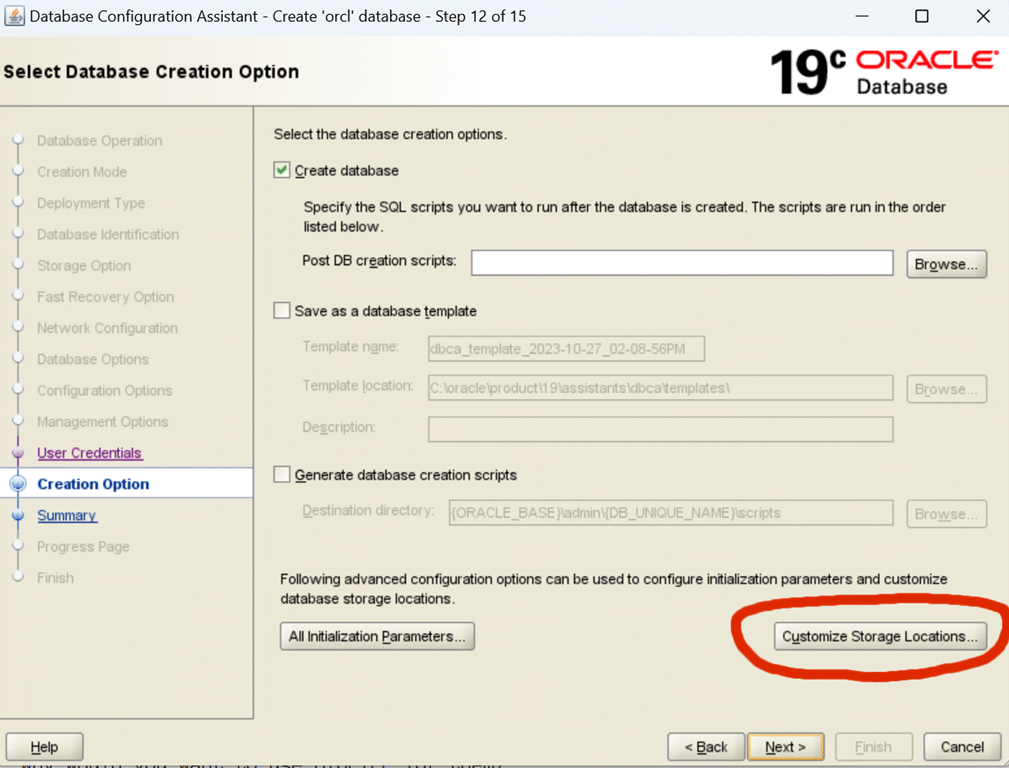
If you don’t build your database with scripts or you are a lover of GUIs, then to achieve this when running DBCA, then you’ll need to do two things

1) We ship the template files as SMALLFILE so you can’t use them. You’ll need to choose Custom creation

image

2) At the final stage, choose Custom Storage, and from in there you can edit each tablespace to be BIGFILE.
image

Of course the big question is:

Since SYSTEM and SYSAUX typically do not get that large, why would you want to use BIGFILE for them?

That’s a story for another blog post, but paradoxically, if you are using any of our smallest databases (Express Edition, Developer Free) then using a default of BIGFILE might be the best decision you ever make.

22 responses to “The smaller the database, the more important BIGFILE is”

  1. Wonderful. I was thinking to move bigfile into small file for a potential problem and of course its a bad idea but still i am desperate cuz the OS file system got a hard limit of 32tb or 64tb which puts a risk of database not able to grow beyond this point. Any thoughts Connor?

    1. Just set “maxsize” on the datafiles and you’re done

  2. How do we make modifications for the BIGFILE in the Docker Installation for Free23c?

    1. Good question – I’ll ask around

      1. The only workaround I found is to recreate FREE/FREEPDB1, than run catalog.sql, catproc.sql

        I had tried useBigFileForTablespace as parameter for dbca but it did’nt work since 23-free-config use restore datafile

  3. Well, now I am looking forward to “a story for another blog post”.

    I have used a BIGFILE tablespace one time when I was forced into a corner by the storage architecture in one situation. The underlying hardware was suitably RAIDed up IAW Oracle docs on BIGFILE, so it was a good fit there. I have worked with hundreds of databases on various projects, and I have never had occasion to use BIGFILE elsewhere.

    Cheers,
    Russ

    1. I am the same – I’ve only used them for large clients when the 32G file size got silly as we head into 1000s of files.

      But …. there is a feature coming (that I’ll blog about when I get free moment) which makes them a really good choice

      1. When I wanted to create BIGFILE tablespaces, the manager and the DBA groups objected. I had 614 small files in tablespace. Eventually, I was allowed when the routine adding new data file caused havoc with the Backup as the last file added was always left out.

        1. They must not have been using RMAN.

          1. They were Gung-ho on RMAN. Never seemed able to provide early warning to application DBAs

  4. I work in a company where an old DBA and coworker insists on keeping the datafiles at 2000M size because, according to him, this does not generate fragmentation of the datafiles/objects.

    Because of this, in some databases with a few terabytes (you already can imagine :), right?? ) …we have many and many datafiles created.

    Is there any document comparing datafile 2000M (or similar) and bigfiles concerning performance/block/fragmentation when using this type of datafile size?

    1. All I can say is that fragmentation in a file occurs at the extent level (and is a total non-issue because 99% of the time, the next extent created simply fills the gap the old one left).

      And extent sizes are not correlated to file size, so 2G, 8G, 32G … it doesn’t matter.

      But I suspect I’m speaking to the converted here 🙂 Perhaps the best example would be to point them at our Autonomous databases – thousands upon thousands of databases, each with thousands of PDBs, and we use 32G files. If there was ever going to be a “fragmentation issue” it would be there… and there isnt 🙂

      1. These kinds of myths persist, even among DBAs. Maybe they are thinking in terms of fragmentation of database disk files at the physical level that could cause degradation of read performance. But, a well tuned buffer cache substantially reduces the number of physical reads so that any such a performance hit would be trivial and not worth considering.

  5. João Borges Barreto Avatar
    João Borges Barreto

    Is it advantageous to change even if sysaux and system are not bigfiles?
    If yes changing the current tablespaces will be, of course, much easier than reinstalling the Database (even if it is just for development)

    1. I would rate bigfile as “the next time you need to create a tablespace, use it”… or “I need to reorg my system anyway, so we may as well do it now”

      1. João Borges Barreto Avatar
        João Borges Barreto

        Thank you Connor!

  6. Having even 32G files on a multi TB system requires permanent monitoring of free space and adding new files to tablespace for years. + as the db size is growing the 15%, 10%, and even 5% free space threshold is increasing proportionally to total TS size.

  7. Having a lot of databases on relatively small Windows platforms with no RAID systems we sometimes have to add a disk to add another datafile on a new partition.
    In those cases, if the tablespace was a bigfile then that wouldn’t help and you wouldn’t be able to extend that tablespace.
    Is there a workaround for those cases?

    1. Isnt that what “Storage Spaces” are for? ie, volume management on top of the disk drives. You add the new drive into an existing volume and spread the existing data across it.

      Disclaimer: I have not explored this in depth, or looked at whether there’s any certification issues etc.

      1. Thanks for the suggestion. Experimenting with Microsoft Storage spaces for new deployments.

  8. I’ve heard that you shouldn’t use a bigfile tablespace because, during an autoextend addition to the tablespace size, all transactions against that tablespace have to wait for that autoextend operation to finish. If you use multiple datafiles then the only transactions that would wait for the autoextend operation to finish would be the ones writing to the single datafile being extended. I’ve not tested this, but do you have any feedback/input on this thought process?

    1. As far back as 10g? (maybe even 9i) we have the SMC process (space management coordinator) that proactively allocates space, so its not like the old days where your tablespace would fill, then you wait whilst autoextend takes place.

Leave a reply to Dennis Ruane Cancel reply

This site uses Akismet to reduce spam. Learn how your comment data is processed.

Trending


