Here’s a quick tip for the weekend.
When you want to create a tablespace, you have the choice of SMALLFILE (the typical default) or BIGFILE. You should probably choose BIGFILE, because after all, if you throw the question of which to use at ChatGPT it will happily tell you:
They offer improved I/O performance because the database can read and write to a single large data file more efficiently than it can with multiple small ones.
That of course is complete tosh, which is why I am writing this post and not some AI. 😂
The choice of which kind of file to use is done at tablespace creation time, eg
create bigfile tablespace bigfile_ts
datafile 'myfile.dbf' size 100g
autoextend on ;
but that raises an interesting question. If it is done on tablespace creation, is it possible to have SYSTEM and SYSAUX defined as BIGFILE? After all, you don’t run a CREATE TABLESPACE command for these, it is done at database creation time.
As per the docs, these tablespaces don’t have an explicit nomination for the file choice, however they will take on the default setting nominated for entire database. Hence if you want to have all of your tablespaces, including SYSTEM and SYSAUX to be BIGFILE type, then you need to set this as the default setting database wide, eg
CREATE DATABASE orcl
MAXINSTANCES 8
MAXLOGHISTORY 1
MAXLOGFILES 16
MAXLOGMEMBERS 3
MAXDATAFILES 1024
DATAFILE '/u01/app/oracle/oradata/ORCL/system01.dbf' SIZE 700M REUSE AUTOEXTEND ON
EXTENT MANAGEMENT LOCAL
SYSAUX DATAFILE '/u01/app/oracle/oradata/ORCL/sysaux01.dbf' SIZE 550M REUSE AUTOEXTEND ON
BIGFILE DEFAULT TEMPORARY TABLESPACE TEMP TEMPFILE '/u01/app/oracle/oradata/ORCL/temp01.dbf' SIZE 20M REUSE AUTOEXTEND ON
BIGFILE UNDO TABLESPACE "UNDOTBS1" DATAFILE  '/u01/app/oracle/oradata/ORCL/undotbs01.dbf' SIZE 200M REUSE AUTOEXTEND ON
CHARACTER SET AL32UTF8
NATIONAL CHARACTER SET AL16UTF16
SET DEFAULT BIGFILE TABLESPACE
LOGFILE
GROUP 1 ('/u01/app/oracle/oradata/ORCL/redo01.log') SIZE 200M,
GROUP 2 ('/u01/app/oracle/oradata/ORCL/redo02.log') SIZE 200M,
GROUP 3 ('/u01/app/oracle/oradata/ORCL/redo03.log') SIZE 200M
...
...
If you don’t build your database with scripts or you are a lover of GUIs, then to achieve this when running DBCA, then you’ll need to do two things
1) We ship the template files as SMALLFILE so you can’t use them. You’ll need to choose Custom creation
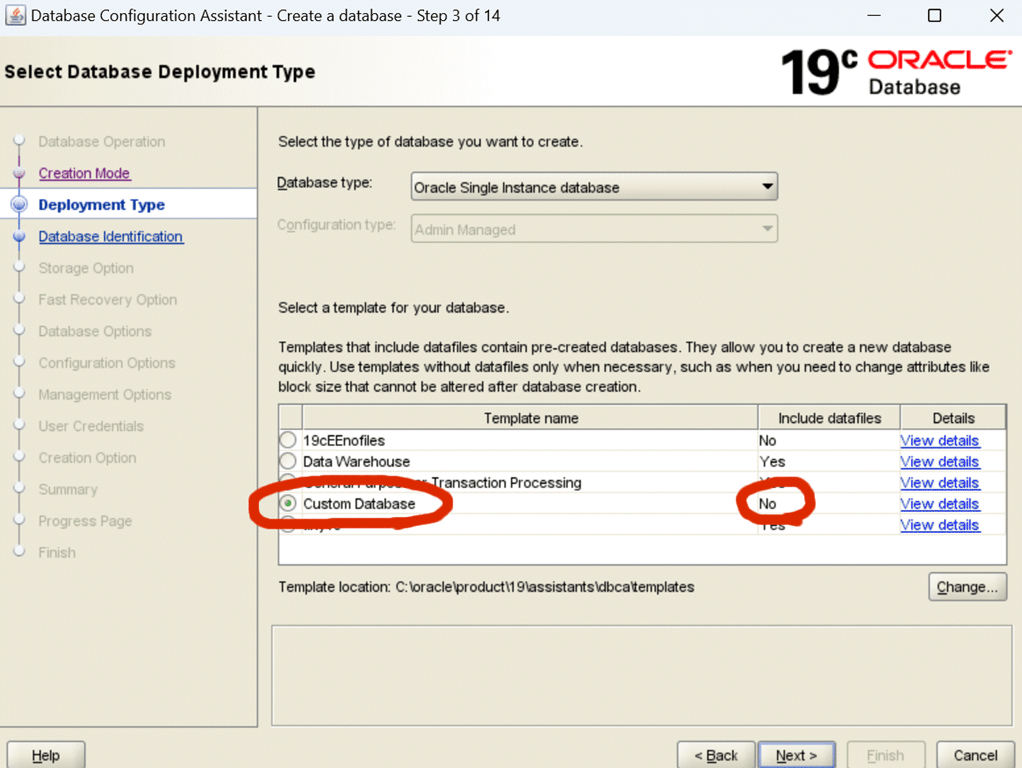
2) At the final stage, choose Custom Storage, and from in there you can edit each tablespace to be BIGFILE.

Of course the big question is:
Since SYSTEM and SYSAUX typically do not get that large, why would you want to use BIGFILE for them?
That’s a story for another blog post, but paradoxically, if you are using any of our smallest databases (Express Edition, Developer Free) then using a default of BIGFILE might be the best decision you ever make.




Leave a Reply to RussCancel reply