I’m a big fan of the “instantclient” solution to Oracle connectivity. No more calls to “runInstaller”, no registry files on Windows, it is just download-unzip-go.

That makes installation a breeze, it makes upgrading a breeze. In my view, the experience is all positive.

However, I’ve had people lament the omission of the “tnsping” command in the instantclient libraries.

My recommendation for that is simple. Simply download recent versions of the tools and you’re done!

In SQLcl, you can perform tnsping from within the tool
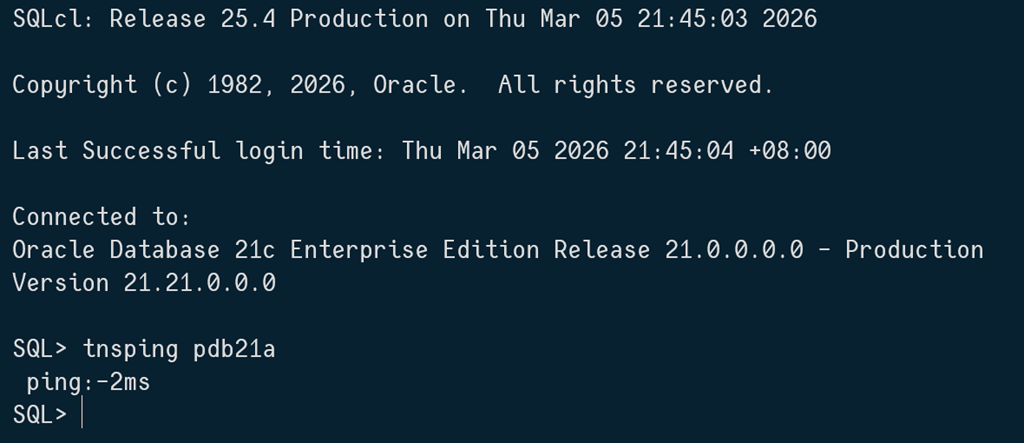
image

And in the latest SQLPlus in the instantclient, the “ping” command does the job.

image

The reason there is not a “tnsping” is … you don’t need one anymore.

2 responses to “Where is my TNSPING?”

  1. Interesting functionality, thank you for the article!

    I tested SQLPlus and works as expected. Unfortunately, SQLc does not seem to work at all.

    SQL*Plus: Release 23.0.0.0.0 – Production on Thu Mar 5 09:33:32 2026 Version 23.9.0.25.07
    SQL> ping prod
    Local Net Naming configuration file: …
    Ok (117.819 msec)

    SQLcl: Release 25.2 Production on Thu Mar 05 09:37:40 2026 Copyright (c) 1982, 2026, Oracle. All rights reserved.
    SQL> tnsping prod
    ping:-2ms

    SQL> tnsping blah
    ping:-2ms

    1. Reproduced in 25.4. Will log a bug

Leave a Reply to IgorCancel reply

Trending

Discover more from Learning is not a spectator sport

Subscribe now to keep reading and get access to the full archive.

Continue reading