First and foremost, a tip of the hat to Oracle ACE Lucas Jellema, who provided the initial inspiration for digging into the OpenWorld session catalog page to data mine its content.
As I posted just before CloudWorld
My strictly off the books, strictly unofficial CloudWorld agenda app in APEX is back for another year.
The easy, fast and flexible faceted search of APEX that you know and love, combined with the ability to download calendar entries for the sessions you want to see at CloudWorld, and most importantly … dark mode and light mode
Like many conferences, the CloudWorld catalog is hosted by a conference events company and thus to some degree you are at the whim of how they like to provide their conference agenda. In the early years of OpenWorld it was pretty dire (imho) but has improved a lot to get to its most recent form, with faceted search and filtering. However, pretty much nothing on the planet can match APEX for its searching and reporting capabilities, so I’ve always wanted to have that same data in an APEX app to give me full control.
The challenge comes when you head over to the session catalog page, and whilst the conference sessions are all present,

when you do the familiar trick of “View Page Source” to find all the information in the HTML content, you’ll discover that all you can see is a large chunk of JavaScript. There is no data in the HTML about the sessions.

The way the data is retrieved and presented is done dynamically by the JavaScript in the page itself. Once the page is rendered (basically empty with header and footer), a REST call is made back to rainfocus to pick up and then present the conference session data. The challenge then becomes how we can do the same and grab a copy of that data in order to load it into our APEX application.
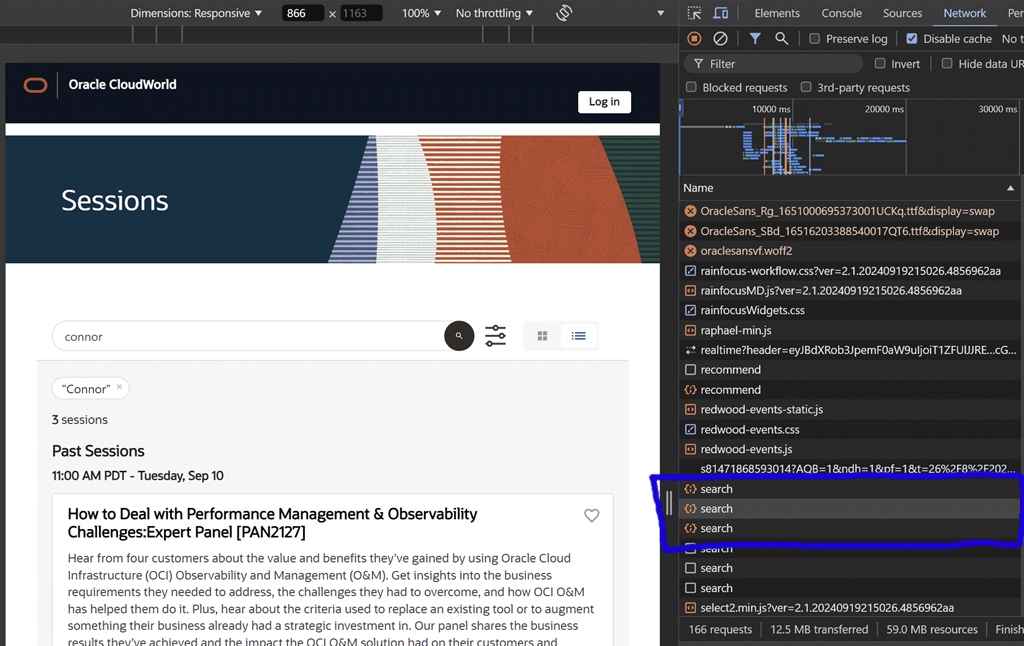
The first thing was to open up Dev Tools and refresh the page and examine the Network tab. With each source, I took a look at the REST call type and the returned data until I came across one that looked promising. In this case, it was the “search” call as seen below.
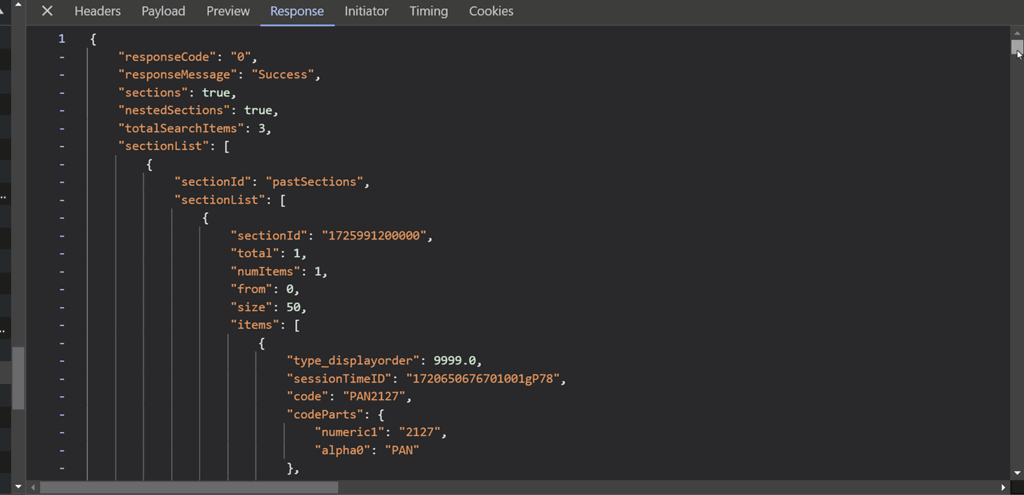
Scrolling across to the Response payload, I could see all of the session data in JSON format. It is an interesting exercise in its own right to see how much data was associated with each session and each speaker.
Thus we need to be able to mimic that “search” REST call that the JavaScript in the browser is issuing. That is not too difficult. We can either take a look at the request Headers to see what was passed in the call.

or perhaps ever easier, we can grab that request and get a complete CURL command equivalent for it.

That reveals the following CURL command (edited for brevity)
curl 'https://events.rf.oracle.com/api/search' \
  -H 'Accept: */*' \
  -H 'Accept-Language: en-GB,en-US;q=0.9,en;q=0.8' \
  -H 'Cache-Control: no-cache' \
  -H 'Connection: keep-alive' \
  -H 'Content-Type: application/x-www-form-urlencoded; charset=UTF-8' \
  -H 'Origin: https://reg.rf.oracle.com' \
  -H 'rfApiProfileId: k5qIfk5iZUYpPxKjzmX3F3RdivJ9F5ru' \
  -H 'rfAuthToken: ee6e8b7c90984d0683b2b9c813a3e190' \
  -H 'rfWidgetId: BNts4YIR7pc0gQNrWbKcxNYs4jHgTgoz' \
  --data-raw 'search=connor&type=session&browserTimezone=Australia%2FPerth&catalogDisplay=grid'
Of course, you could then simply build a list of CURL commands to fetch whatever information you wanted from the catalog, but I wanted something that I could run from the database so that I would be able to automatically refresh the data in my APEX application whenever I wanted to. And because I’m using APEX, I can take advantage of the APEX_WEB_SERVICE package to easily compose a REST call that matches the headers in the CURL command.
declare
  l_clob           clob;
  l_rfapiprofileid varchar2(100) := 'k5qIfk5iZUYpPxKjzmX3F3RdivJ9F5ru';
  l_rfwidgetid     varchar2(100) :='BNts4YIR7pc0gQNrWbKcxNYs4jHgTgoz';

begin
  apex_web_service.set_request_headers (
      'content-type', 'application/x-www-form-urlencoded; charset=UTF-8',
      'priority', 'u=1, i',
      'rfapiprofileid', l_rfapiprofileid,
      'rfwidgetid', l_rfwidgetid
  );

  l_clob := apex_web_service.make_rest_request(
      p_url         => 'https://events.rf.oracle.com/api/search',
      p_http_method => 'GET',
      p_parm_name   => apex_util.string_to_table('search:type:browserTimezone:catalogDisplay'),
      p_parm_value  => apex_util.string_to_table(':session:Australia%2FPerth:grid'),
      p_wallet_path=>'system:'
  );
end;
Once this basic test was working, I could enhance it to handle things like paging of results and keeping a copy of each JSON response in a database table.
SQL> declare
  2    l_clob     clob;
  3    l_total    int;
  4    l_pk       int := 1;
  5    l_offset   int;
  6    l_pagesize int;
  7
  8    l_rfapiprofileid varchar2(100) := 'k5qIfk5iZUYpPxKjzmX3F3RdivJ9F5ru';
  9    l_rfwidgetid varchar2(100) :='BNts4YIR7pc0gQNrWbKcxNYs4jHgTgoz';
 10
 11  begin
 12    apex_web_service.set_request_headers (
 13        'content-type', 'application/x-www-form-urlencoded; charset=UTF-8',
 14        'priority', 'u=1, i',
 15        'rfapiprofileid', l_rfapiprofileid,
 16        'rfwidgetid', l_rfwidgetid
 17    );
 18
 19    -- get first page of results
 20
 21    l_clob := apex_web_service.make_rest_request(
 22        p_url         => 'https://events.rf.oracle.com/api/search',
 23        p_http_method => 'GET',
 24        p_parm_name   => apex_util.string_to_table('search:type:browserTimezone:catalogDisplay'),
 25        p_parm_value  => apex_util.string_to_table(':session:Australia%2FPerth:grid'),
 26        p_wallet_path=>'system:'
 27    );
 28
 29    -- save to db
 30
 31    insert into ocw values (l_clob);
 32
 33    -- find total number of items to fetch
 34
 35    select json_value(t.c, '$.totalSearchItems')
 36    into   l_total
 37    from ocw t
 38    where id = l_pk;
 39
 40    -- and how many per page
 41
 42    select json_value(t.c, '$.sectionList[0]."size"')
 43    into   l_pagesize
 44    from ocw t
 45    where id = l_pk;
 46
 47    -- loop through each page to grab the next set of results
 48
 49    l_offset := l_pagesize;
 50    while l_total > l_offset
 51    loop
 52      l_pk := l_pk + 1;
 53      l_clob := null;
 54
 55      apex_web_service.set_request_headers (
 56          'content-type', 'application/x-www-form-urlencoded; charset=UTF-8',
 57          'priority', 'u=1, i',
 58          'rfapiprofileid', l_rfapiprofileid,
 59          'rfwidgetid', l_rfwidgetid
 60      );
 61
 62      l_clob := apex_web_service.make_rest_request(
 63          p_url         => 'https://events.rf.oracle.com/api/search',
 64          p_http_method => 'GET',
 65          p_parm_name   => APEX_UTIL.string_to_table('search:type:browserTimezone:catalogDisplay:from'),
 66          p_parm_value  => APEX_UTIL.string_to_table(':session:Australia%2FPerth:grid:'||l_offset),
 67          p_wallet_path=>'system:'
 68      );
 69
 70      insert into ocw values (l_pk,l_clob);
 71
 72      l_offset := l_offset + l_pagesize;
 73    end loop;
 74  end;
And that was pretty much it, because the moment I had the JSON stored in the database, I can immediately use all the cool JSON goodies in the Oracle Database to extract the data however I wanted. A little bit of JSON_TABLE and all the session details were now available to me.

Voila!




Leave a Reply to iudithd5bf8e4d8dCancel reply