For many people in the Oracle community, downloading and configuring Oracle Express Edition or Oracle Database Free (For the rest of this post, I’ll use the term “Express Edition” to mean both) is about being able to easily bring yourself up to speed on the latest features available in the Oracle Database, as well getting accustomed to the software layout and day-to-day tasks that administering such an environment would entail at the Enterprise Edition or Standard Edition level.
Sidenote: If you’re just looking at having a database to use with minimal fuss, then Free Forever on Autonomous is probably your better option.
But for others, Express Edition IS their database version of choice, and their intention is to run fully fledged apps on this platform. The official stance from Oracle is that we don’t recommend this due to the absence of regular security updates, but for requirements where this is of lesser importance due to the nature of the data being stored, or if the apps are not going to be exposed to the public internet, Express Edition can be a very attractive proposition.
Given the insane performance of CPUs nowadays, the concurrent thread restrictions are on Express Edition still allow crazy levels of performance from the database. I’ve done Swingbench demos on my laptop at hundreds of transactions per second just on a single thread. Hence, the performance limits of Express Edition are rarely an issue, so it is the storage restrictions that most likely to be your limiting factor, which brings me to this:
IF SPACE IS A CONCERN, FOR EXPRESS EDITION YOU MUST READ THIS POST 😀
In order to give the community the closest thing possible to a full Enterprise Edition experience, Express Edition comes with just about all of the “bells and whistles” available in our flagship product. For the same reason, we did not want to hobble the experience with something that checks your space utilisation every single time you add a row to the database. We want to be as non-intrusive as possible, so just keeping an eye on the datafile size is an easy solution to this. We only need to check if you are close the limit when a datafile needs to auto-extend, if you manually resize an existing file, or create a new one. If any file grows to over 12GB, then (by definition) we know you have pretty much hit the size limits of Express Edition. You can fill that datafile with whatever data you want, but you cannot increase the size of that file.
But… (yes, you knew there was going to be a “but” didn’t you) 😀.
Consider the default installation and typical usage of Express Edition and what will be present in the SYSAUX tablespace. You can query V$SYSAUX_OCCUPANTS for detailed list, but paraphrasing a little you’ll see the following
- Some database options (XMLDB, Spatial, Workspace Manager, Text, OLAP etc)
- Job scheduler/task maintenance
- Audit trails
- SQL performance managements facilities
- Workload Repository
- Optimizer history
- APEX default installation
Why is this a big deal? The plethora of different metadata repositories in SYSAUX means that the underlying datafile might grow to 12GB without you noticing it, at which point, your Express Edition database will now be deemed “full”. The majority of these metadata repositories remain relatively static in size. However, some of them might grow quickly depending on your usage of the database, and don’t forget, we’re trying to give you the closest thing to an Enterprise Edition experience, so the default usages for these components will mirror Enterprise Edition settings (where there is no cap on size).
And… more importantly…there could be a nasty surprise waiting for you if your SYSAUX tablespace hits 12GB.
Let’s say you have been going with the defaults, and you are using SYSAUX as per a typical installation. In your case, let’s assume your app uses the job scheduler subsystem heavily which means a larger scheduler historical data volume. My SYSAUX tablespace has grown to 12G as per below.
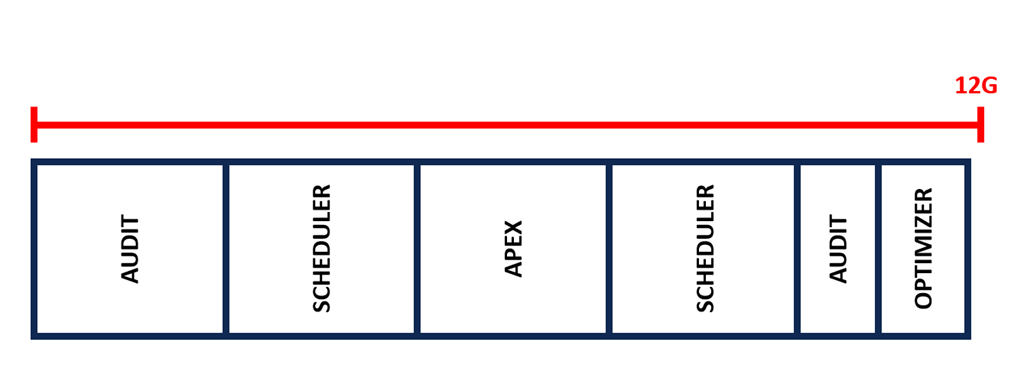
The entire database file distribution looks like this
SQL> @tspace
Enter value for tablespace_name:

TABLESPACE_NAME          FILE_NAME                                              BYTES      AUTO
------------------------ -------------------------------------------------- ---------- --------
SOE                      /opt/oracle/oradata/XE/XEPDB1/soe01.dbf                 1024m   32767m
SYSAUX                   /opt/oracle/oradata/XE/XEPDB1/sysaux01.dbf             11900m   32768m
SYSTEM                   /opt/oracle/oradata/XE/XEPDB1/system01.dbf               280m   32768m
TEMP                     /opt/oracle/oradata/XE/XEPDB1/temp01.dbf                 340m   32768m
UNDOTBS1                 /opt/oracle/oradata/XE/XEPDB1/undotbs01.dbf              130m   32768m
USERS                    /opt/oracle/oradata/XE/XEPDB1/users01.dbf                 30m   32768m
What happens when you try to create a table in your own user tablespace (SOE)?
SQL> create table t1 tablespace soe
  2  as select * from dba_objects;
create table t1 tablespace soe
*
ERROR at line 1:
ORA-12954: The request exceeds the maximum allowed database size of 12 GB.
Uh oh… you have a problem. The size of SYSAUX being near 12GB means you can no longer extend any of your datafiles.
You’re thinking to yourself … “That’s annoying but fixable. I’ll reshuffle things in SYSAUX to make some room“.
Firstly you export all of your APEX workspaces and apps, drop the installation and re-install it in a new tablespace. That in itself is a non-trivial undertaking. Similarly, there are APIs available to relocate the Audit Trail components into their own tablespace, so you go ahead and do that as well.
Now SYSAUX is 50% empty, and you try again:
SQL> create table t1 tablespace soe
  2  as select * from dba_objects;
create table t1 tablespace soe
*
ERROR at line 1:
ORA-12954: The request exceeds the maximum allowed database size of 12 GB.
Of course, the SYSAUX datafile is still 12GB in size, so maybe you need to resize SYSAUX to be smaller first. So you try this:
SQL> alter database datafile '/opt/oracle/oradata/XE/XEPDB1/sysaux01.dbf' resize 6G;
alter database datafile '/opt/oracle/oradata/XE/XEPDB1/susaux01.dbf' resize 6G
*
ERROR at line 1:
ORA-03297: File contains used data beyond requested RESIZE value.
The problem is, that after your cleanup, the SYSAUX datafile now looks like this:
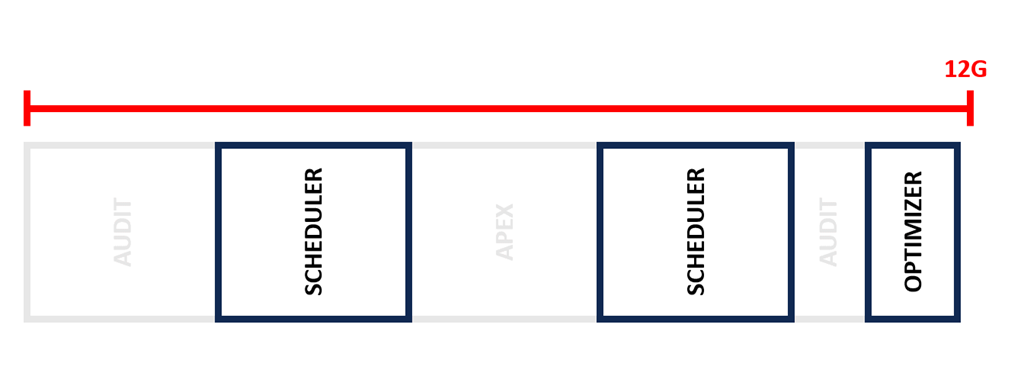
There is plenty of free space, but if you query DBA_EXTENTS, you will discover that there are still segments up near the high watermark of the datafile.
SQL> select max(block_id)
  2  from   dba_extents
  3  where  tablespace_name = 'SYSAUX';

MAX(BLOCK_ID)
-------------
      1441792          -- equates to 11.3GB
You then go ahead and determine what segment is occupying that extent, and in this case it turns out to be SYS.SQLOBJ$PLAN, which is one of the tables the optimizer stores some metadata in.
You are thinking to yourself: “No problem. I’ll just run ALTER TABLE .. MOVE to relocate that to empty space lower in the datafile”
And then this happens:
SQL> conn /@xepdb1 as sysdba
Connected.

SQL> alter table sys.SQLOBJ$PLAN move;
alter table sys.SQLOBJ$PLAN move
*
ERROR at line 1:
ORA-00997: illegal use of LONG datatype
This table can not be moved. And if you search through V$SYSAUX_OCCUPANTS you’ll discover there is no supported relocate/move procedure for optimizer tables. Note that it was not the “fault” of the optimizer, it just so happened that an optimizer table was the unfortunate one to be the last in line in allocating a new extent in SYSAUX. It was the volume of the scheduler data that pushed SYSUAX out to 12GB, but cleaning up the scheduler data is not going to help you. And of course, there might be dozens of extents from different tables in SYSAUX that are all out near this high water mark.
Key point
If SYSAUX gets to 12G, your database might have reached the end of the road.😥
At this point, your recourse is probably going to require exporting/importing the entire database into a fresh installation of Express Edition, at which point you begin the entire cycle again.
Is there a solution?
As the saying goes, prevention is better than cure, so whether you are installing Express Edition for the first time, or whether you are about to export/import your existing database into a fresh one because you have hit this problem, you want to take steps to configure the database to eliminate the chances of this issue biting you (again).
I did a survey some months back asking community members to send their SYSAUX space distribution for any Express Edition databases they were managing. Based on those results, the key elements to focus on are Audit, Job Scheduler, APEX, AWR, and the Optimizer.
So here are my recommendations for ensuring you can squeeze every last drop out of your 12GB sized database.
1) Move audit out of SYSAUX.
Build a new tablespace just for audit
create tablespace audit_trail
datafile '/opt/oracle/oradata/XE/XEPDB1/audit01.dbf' size 20m
autoextend on next 2m;
and then move all of the audit components into this new tablespace.
begin
dbms_audit_mgmt.set_audit_trail_location(
   audit_trail_type=>dbms_audit_mgmt.audit_trail_aud_std,
   audit_trail_location_value=>'AUDIT_TRAIL');
end;
/

begin
dbms_audit_mgmt.set_audit_trail_location(
   audit_trail_type=>dbms_audit_mgmt.audit_trail_fga_std,
   audit_trail_location_value=>'AUDIT_TRAIL');
end;
/
begin
dbms_audit_mgmt.set_audit_trail_location(
   audit_trail_type=>dbms_audit_mgmt.audit_trail_db_std,
   audit_trail_location_value=>'AUDIT_TRAIL');
end;
/
begin
dbms_audit_mgmt.set_audit_trail_location(
   audit_trail_type=>dbms_audit_mgmt.audit_trail_unified,
   audit_trail_location_value=>'AUDIT_TRAIL');
end;
/
2) APEX installations into their own tablespace.
Use a new tablespace for each APEX installation. So if you were installing APEX 22, you would do something like:
create tablespace apex22
datafile '/opt/oracle/oradata/XE/XEPDB1/apex22.dbf' size 20m
autoextend on next 20m;

@apexins APEX22 APEX22 TEMP /i/
and when the time comes to upgrade to APEX 23, you would create a new tablespace to hold it and install into that.
create tablespace apex23
datafile '/opt/oracle/oradata/XE/XEPDB1/apex23.dbf' size 20m
autoextend on next 20m;

@apexins APEX23 APEX23 TEMP /i/
Then once you have fully migrated to the new release, remove the old installation and drop the old tablespace to reclaim that space.
3) Decide on retentions for growth components
As I mentioned, we’re delivering an Enterprise Edition-like experience, which means we provide robust retention periods for components in SYSAUX. You might want to trade away some of those retentions for better space availability for your own apps. Obviously this is a balancing act that needs to be carefully considered to find the sweet spot for your particular requirements. For example, I could opt for 7 days data retention for my high risk areas:
exec dbms_workload_repository.modify_baseline_window_size(window_size =>7);
exec dbms_workload_repository.modify_snapshot_settings(retention=>7*1440);

exec dbms_stats.alter_stats_history_retention(7);
exec dbms_scheduler.set_scheduler_attribute('log_history',7);
and even though audit now is in its own tablespace, I might opt for similar retention there as well
begin
 dbms_audit_mgmt.set_last_archive_timestamp(
   audit_trail_type=>dbms_audit_mgmt.audit_trail_unified,
   last_archive_time=>sysdate-7);
end;
/
If your Express Edition installation is just a training and learning play thing, then of course, you have no worries at all. But for those of you who discovered that Express Edition has so much power and functionality that it can serve as a vital piece of the database machinery in your organisation, hopefully this post lets you continue to exploit all of that power to its fullest extent.
Addenda Feb 2025: See the comments below, it might also be prudent to disable automatic statistics tasks via
exec dbms_stats.set_global_prefs(‘AUTO_STATS_ADVISOR_TASK’,’FALSE’);






 Learning is not a spectator sport
Leave a reply to AWR extract – Why did SYSAUX explode? – Learning is not a spectator sport Cancel reply